
- Connection
- Specification
- Connector Color
- Bluetooth
- Operating System
Adapter Firmware
Note, You must order and mail the Adapter to BlueFire according to the instructions below if you are not going to update the Adapter yourself.
Update the Firmware on your Adapter. You can view all the Firmware changes on the BlueFire Forum..
To update your Firmware you need to place an order for the update (from the buttons at the bottom of the page) and then send in your Adapter according to the instructions below.
Note, if you have a 4.1 hardware Adapter, you can download and update the Firmware yourself with a Windows computer from this link. See the Getting Started Document's Firmware Update section for more information.
If your Adapter is a 3.1 (Bluetooth LE) Adapter it will be upgraded it to the new 4.1 hardware.
Note, if your Adapter is a 2.1 (Bluetooth Classic) Adapter you need to order the upgrade from this page.
See here for the latest updated changes.
It is highly recommended that you update your Firmware as future App versions will no longer support older Firmware versions. Plus the 4.1 hardware upgrade greatly improves the Adapter connection.
Along with sending us your Adapter you also need to include a copy of the update order or a reference to the order number.
Send your Adapter along with a copy of this order (or just the order number) to the address below and we will update the firmware and ship the Adapter back to you according to your order shipping.
DO NOT Send any Adapter 6-pin or ALDL Connectors, just send the Adapter by itself.
BlueFire LLC
20250 276th Ave SE
Unit 264
Hobart, WA 98025-5012
Note, this is a PO Box and we check it every afternoon at the end of the day.
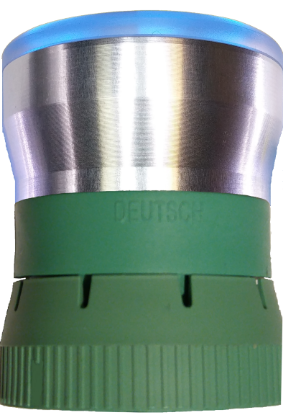
Update the Adapter Hardware/Firmware
Note, You must order and mail the Adapter to BlueFire according to the instructions below if you are not going to update the Adapter yourself.
This update now includes the 4.1 hardware upgrade for 3.1 BLE adapters. This upgrade has significant improvements over the 3.1 version, but you need to send your Adapter in to get the initial upgrade. Once your Adapter is upgraded, you can use the Firmware Update program for future updates. The Firmware and Hardware changes can be found at this link.
Note, if you have a 4.1 hardware Adapter, you can download and update the Firmware yourself with a Windows computer from the link on the Firmware Update Page. See the Getting Started Document's Firmware Update section for more information.
Send your Adapter along with a copy of this order (or just the order number) to the address below and the firmware will be updated and your Adapter shipped back to you according to your order shipping. Turnaround time is usually the day after receiving your adapter.
DO NOT Send any Adapter 6-pin or ALDL Connectors, just send the Adapter by itself.
BlueFire LLC
20250 276th Ave SE
Unit 264
Hobart, WA 98025-5012
Note, this is a PO Box and we check it every afternoon at the end of the day.

Update the Adapter Hardware/Firmware with Free Shipping (US Only)
Note, You must order and mail the Adapter to BlueFire according to the instructions below if you are not going to update the Adapter yourself.
This update now includes the 4.1 hardware upgrade for 3.1 BLE adapters. This upgrade has significant improvements over the 3.1 version, but you need to send your Adapter in to get the initial upgrade. Once your Adapter is upgraded, you can use the Firmware Update program for future updates. The Firmware and Hardware changes can be found at this link.
Note, if you have a 4.1 hardware Adapter, you can download and update the Firmware yourself with a Windows computer from the link on the Firmware Update Page. See the Getting Started Document's Firmware Update section for more information.
Free Shipping is USPS Ground. If you need different shipping, order the update without free shipping.
Send your Adapter along with a copy of this order (or just the order number) to the address below and the firmware will be updated and your Adapter shipped back to you according to your order shipping. Turnaround time is usually the day after receiving your adapter.
DO NOT Send any Adapter 6-pin or ALDL Connectors, just send the Adapter by itself.
BlueFire LLC
20250 276th Ave SE
Unit 264
Hobart, WA 98025-5012
Note, this is a PO Box and we check it every afternoon at the end of the day.